

Event case study · San Francisco
San Francisco Community Conference AV
A community conference setup combining a panel area, a lectern, projection and freestanding displays. This example from our event gallery shows how several presentation needs can fit into one room.
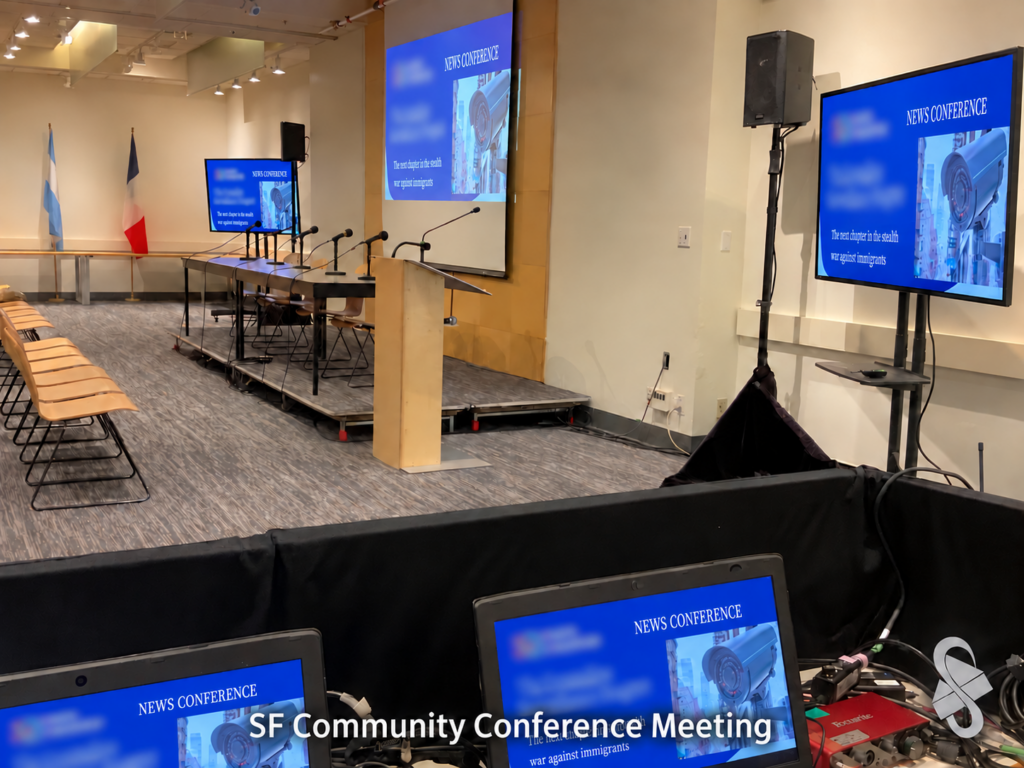
The event setting
The photographed room has audience seating facing a raised presentation area. A table with microphones provides a panel position, while a lectern gives a standing speaker a separate place to present.
The setup includes a central projection screen and freestanding TV displays on either side of the presentation area.
Equipment visible in the setup
- Projection screen and presentation image
- Two freestanding TV displays
- Speakers on stands
- Tabletop microphones and a lectern microphone
- Laptops and AV controls at a separate work position
What this layout demonstrates
A panel and a lectern serve different speaking formats. Planning both positions helps determine microphone quantities, cable routes and the space needed between speakers and the audience. The side displays also provide presentation surfaces away from the central screen.
Planning a similar conference
Send a room plan, the number of people speaking at once and your presentation format. Let us know whether the event includes panel discussion, audience questions, videos with sound or a change between presenters.
For multiple displays, confirm whether every screen should show the same content. Include time for laptop connections, a microphone check and a presentation rehearsal before guests arrive.
Explore the Corporate Presentation AV Package, compare projectors and screens, or browse TV and monitor rentals.
Plan your conference AV
Share your San Francisco venue, room layout, agenda, presenter count and setup schedule. We will tailor the equipment and support to your event.